CoastfulGet Coastful

NET WORTH & RETIREMENT PLANNING

Track your net worth.
Plan your retirement.

Update your assets and debts, see your progress, and explore when you could retire.

Compare how long to save, when to stop saving, and how to use your money in retirement.

On-device calculationsNo bank loginsiPhone & Android
Track your net worth
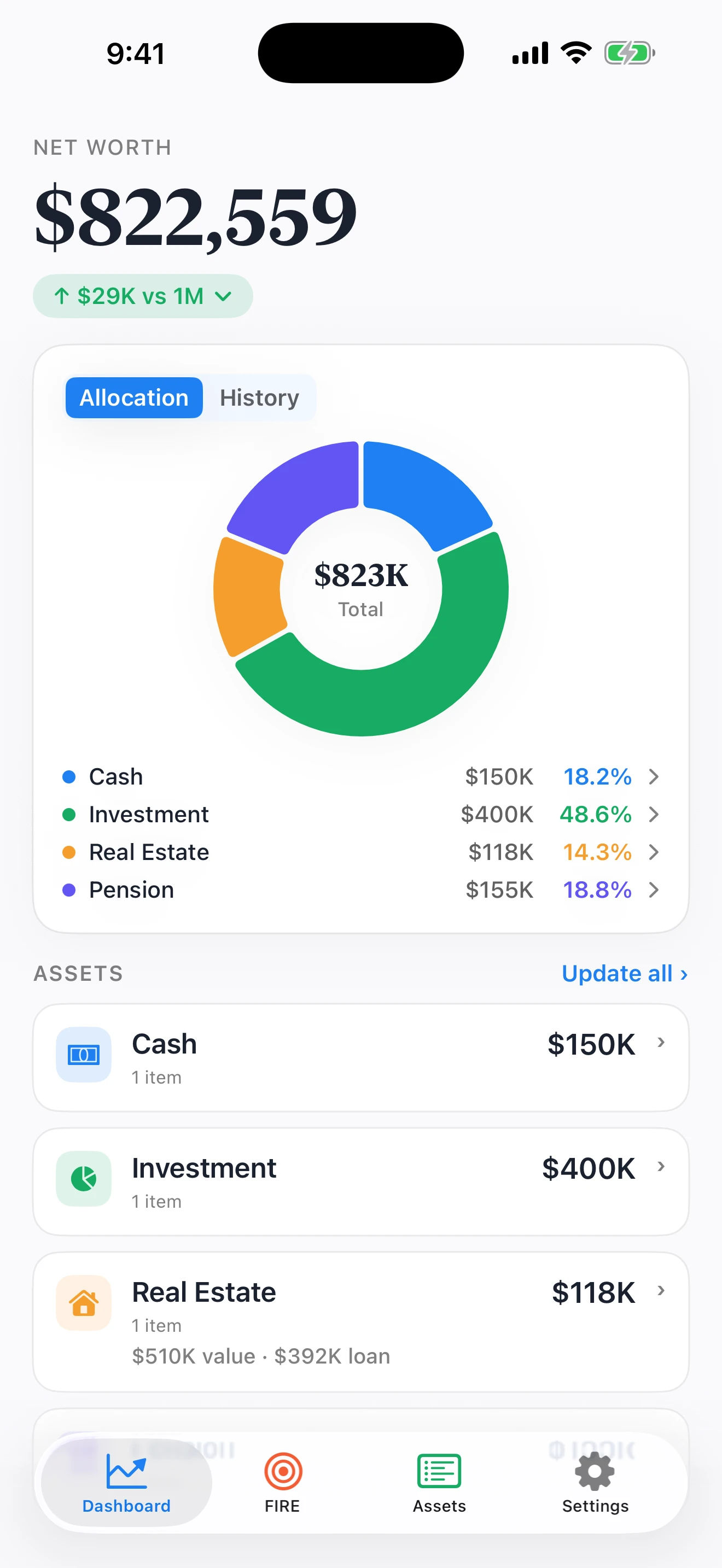
Coastful Pro net worth dashboard showing balances, portfolio allocation, and asset updates
Plan your retirement
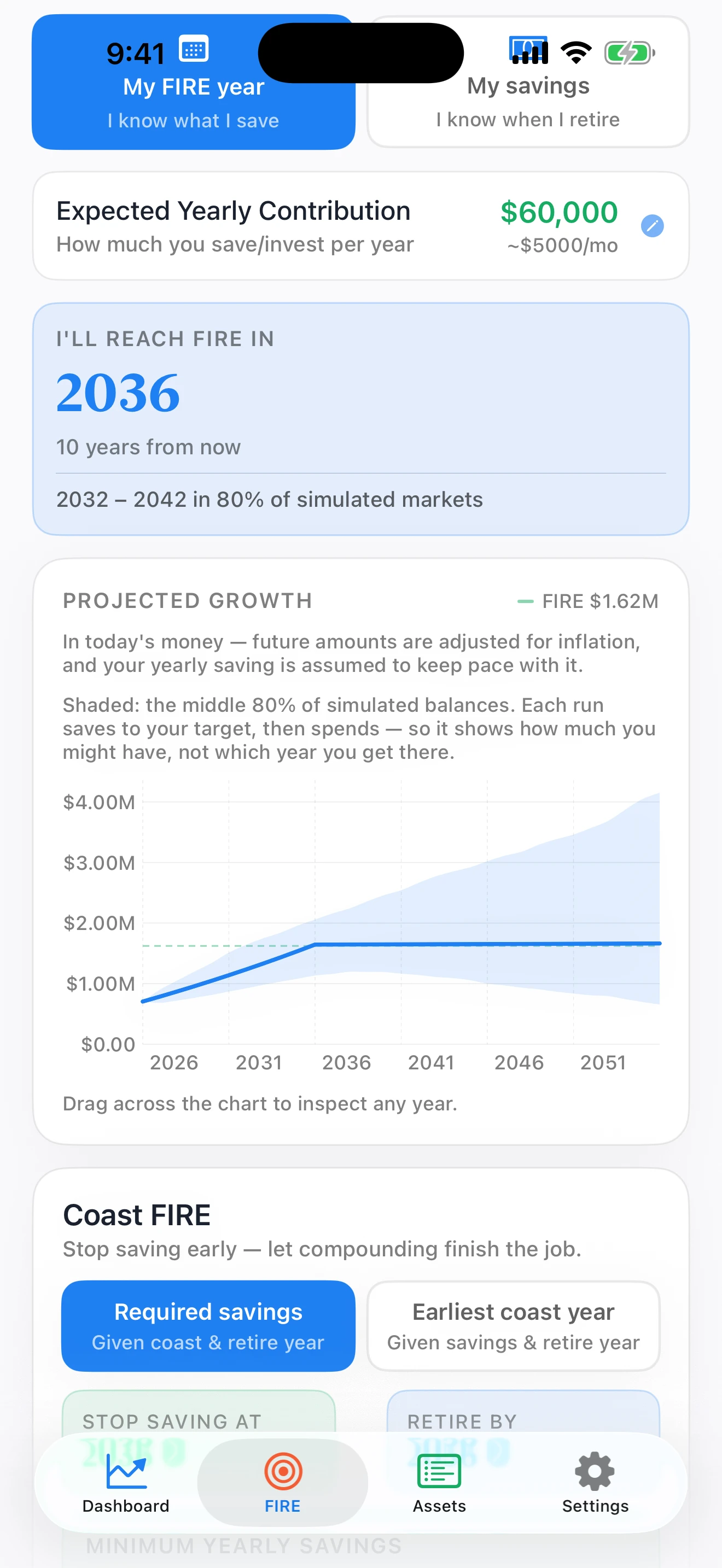
Coastful Pro FIRE projection showing a retirement timeline and shaded Monte Carlo range

Actual Pro screens · sample portfolio

Track your money. Compare your retirement options.Compare the plans ↓

01 / FIND YOUR WAY

Three retirement plans.

FIRE means financial independence, retire early. Compare saving until retirement, stopping savings earlier, or drawing down your portfolio.

Coastful Pro regular FIRE projection showing saving until FIRE, then retirement spending
Regular FIRE projection: saving until FIRE, then funding retirement. Pro screenshot; sample portfolio.
Coastful Pro Coast FIRE chart with saving, slower coasting growth, a flat retirement projection, and a shaded Monte Carlo range
Actual Pro example: 2.5% growth and withdrawal assumptions. The shaded range shows simulated balances.
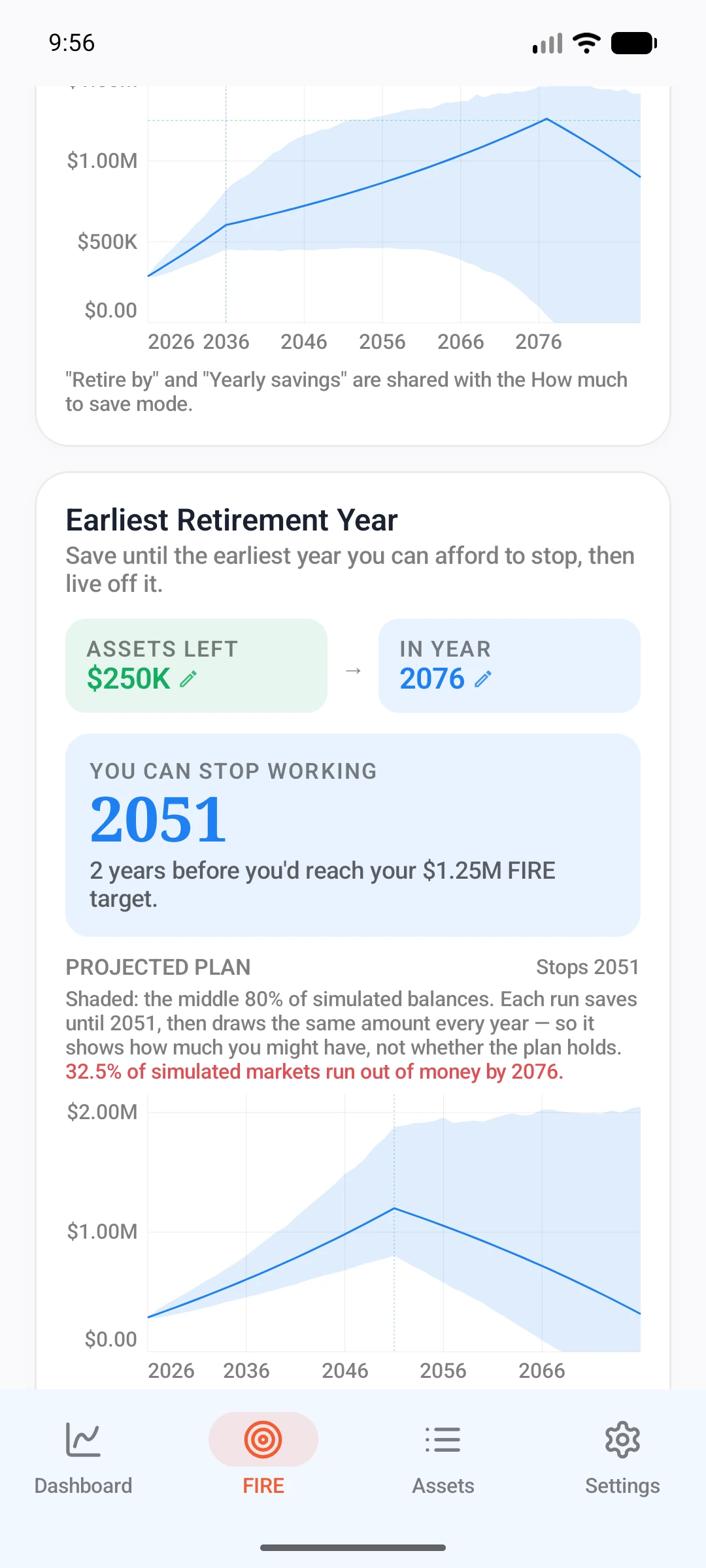
Coastful Pro retirement spending plan with a chosen end balance
Saving → using. Pro spending plan with a chosen end balance. Sample portfolio.
REGULAR FIRE

When could work
become optional?

Save and invest until your portfolio reaches your FIRE target, then use it to fund your life in FIRE. Estimate that transition year, or choose a year and explore the savings needed.

Explore the uncertainty behind the date ↗
  1. SavingBuild your portfolio
  2. FIREFund your life
TODAYYOUR FUTURE

Phases are illustrative. Actual balances can rise or fall.

COAST FIRE · PRO

Stop saving.
Keep growing toward your goal.

Save and invest first. Then stop adding new savings while your investments grow toward your FIRE target, covering living costs with other income. Enter FIRE when your portfolio can fund your life.

Set a stop-saving year and a retirement goal, then explore the yearly savings needed or your earliest coast year.

Understand the Coast FIRE number ↗
  1. SavingAdd to your portfolio
  2. Stop savingGrowth without new savings
  3. FIREFund your life
TODAYYOUR FUTURE

Growth slows when saving stops. Illustrative phases; actual balances can rise or fall.

RETIREMENT SPENDING · PRO

Plan to use
what you’ve built.

Save and invest first, then start using your portfolio. Choose a future year and the balance you want left at that point: zero, a cushion, or an inheritance.

Compare drawing down toward zero with keeping a cushion or inheritance. Review the simulated share of paths that run out before your chosen year.

Understand simulated outcomes ↗
  1. SavingBuild your portfolio
  2. UsingDraw from your portfolio
TODAYYOUR FUTURE

Phases are illustrative. Actual balances can rise or fall.

YOUR PORTFOLIO, AT A GLANCE
Coastful Pro dashboard showing net worth, allocation, History tab and Update all control
Your history → Your next step

02 / KEEP THE PICTURE CURRENT

See your progress.
Stay connected
to your plan.

Your finances keep changing. Your retirement plan should come with you.

  1. 01

    Update your portfolio.

    Refresh your asset balances and debts as life changes. You enter the numbers; no bank connection is needed.

  2. 02

    See your wealth over time.

    Look back through recorded net worth history and see how your financial picture has changed.

  3. 03

    Revisit your FIRE progress.

    Bring your latest balances into your plan and explore what they mean for your next milestone.

Recorded history looks back. Retirement projections look ahead.

03 / MAKE ROOM FOR UNCERTAINTY

One plan.
Many possible futures.

The solid line projects your plan at the assumed return with no volatility. Separately, Coastful runs about 2,000 Monte Carlo simulations with varying yearly returns to calculate the shaded balance range.

THE SHAPE OF UNCERTAINTY
A steady projection and a separate Monte Carlo rangeIllustrative saving-only model over 20 years. The solid line has no volatility. Twelve example paths are shown from 2,001 simulations; shading spans the 10th to 90th percentile at each year. TODAY20 YEARSILLUSTRATIVE BALANCE · NORMALIZED UNITS

The solid line is calculated separately at a steady assumed return, with no volatility.

Different yearly return sequences create different balance paths. Twelve are shown here from 2,001 simulations. The solid line does not change.

The shading comes from the 10th to 90th percentile of all 2,001 simulated balances at each year. The solid line is still the same separate projection.

Solid line: no-volatility projection Thin lines: example simulated paths Shading: Monte Carlo balance rangeEducational example
Illustration assumptions

This simplified example starts with 100 units, adds 5 units at each year end, and uses a 5% expected annual return over 20 years. Simulated annual returns have 12% volatility; the solid line uses none. Shading uses all 2,001 paths, while only 12 example paths are drawn. Amounts are normalized units, not currency. This saving-only illustration excludes inflation, taxes and withdrawals and is separate from Coastful’s app calculations.

The solid line assumes no volatility.

It is calculated from your plan at the assumed return held steady. It does not come from the Monte Carlo simulations and is not their average or median.

The shaded range comes from Monte Carlo.

It shows the middle 80% of simulated balances at each year: the 10th to 90th percentiles. It is not an 80% guarantee that your plan will succeed.

The question still matters.

Balances, FIRE dates and depletion percentages describe different outcomes under your assumptions.

Learn how to read a Monte Carlo simulation ↗

THE DETAILS THAT MAKE IT YOURS

A fuller picture.
Fewer loose ends.

↗

Your assumptions

Adjust expected returns, volatility, inflation and withdrawal rates to explore your own view of the future.

◷

Pension access timing

Set when pension funds become available, so inaccessible money doesn’t fund the years before access opens.

⇄

Multiple currencies

Track assets in 30+ currencies and view your portfolio in your chosen app currency.

⌁

What-if scenarios PRO

Explore extra savings, a market drop or a home move as additional checks on your plan.

PERSONAL FINANCES. PERSONAL SPACE.

Your numbers belong
with you.

No bank credentials. You enter and control your own values.

Calculations on your device. Your core planning works offline.

Optional biometric lock. Keep your financial picture private.

Read about data and privacy ↗Optional exchange rates, purchases, iCloud sync and enabled app analytics use a connection. Financial amounts are not included in app analytics.

START WHERE YOU ARE

Build a habit.
Open up your options.

Start tracking and planning for free. Choose Pro to explore more ways to retire.

COASTFUL

Your foundation.

Free

Keep your portfolio and FIRE plan together.

  • Net worth history and allocation
  • Up to 10 assets, unlimited snapshots
  • FIRE year and required-savings planning
  • Monte Carlo projected balance ranges
  • Personalized or custom withdrawal rate
  • On-device backup and biometric lock
Start your plan ↗
THE COAST FIRE GUIDE

Understand your
Coast FIRE number.

Read the guide ↗
THE MONTE CARLO GUIDE

Read the range.
Understand the assumptions.

Read the guide ↗

A LITTLE MORE CLARITY

Good
questions.

What is Coast FIRE and how is it different from regular FIRE?
Coast FIRE models a point after which you stop adding new savings and let the invested portfolio grow toward a later retirement target. You still need other income to cover expenses during that period. FIRE models a portfolio funding your spending. Both depend on your assumptions; neither is a guaranteed date.
Is Coastful free to use?
Yes. The free tier includes FIRE-year and required-savings calculations, Monte Carlo projected balance ranges, personalized withdrawal assumptions, net worth tracking, and up to 10 assets. Coastful Pro adds Coast FIRE, retirement spending plans, what-if scenarios, unlimited assets, and optional iCloud sync on iOS. Check your platform store for current prices and trial eligibility.
Does Coastful connect to my bank or brokerage?
No. Coastful never connects to banks, brokerages, or any financial aggregator. You enter your own asset values, and they're stored on your device — there are no ZW Studio accounts. Coastful Pro offers optional iCloud sync on iOS, which keeps data inside your own Apple iCloud, never on our servers. Coastful does use anonymous, opt-out usage analytics (Google Analytics for Firebase) to improve the app and measure our advertising, but your financial data is never collected — see our Privacy Policy.
What is a Personalized Safe Withdrawal Rate?
In Advanced mode, Coastful starts with a withdrawal assumption derived from your portfolio’s expected return after inflation. You can also set your own rate or compare with the 4% base case. This is a model input, not a certified safe rate: actual returns, spending, and investment risks can differ from your assumptions.
Can I track assets in different currencies?
Yes. Coastful supports 30+ currencies (USD, EUR, GBP, JPY, CNY, INR, and more). Each asset can be in its own native currency, and Coastful auto-converts to your chosen app currency using daily reference rates from the European Central Bank (via api.frankfurter.dev). The conversion is anonymous — no user data is sent, and rates are cached on-device for 24 hours. Single-currency users (everything in the same currency as the app) do not need exchange-rate requests.
Does Coastful work offline?
Your entered data, calculations and projections work offline. Optional features such as exchange-rate updates, iCloud sync on iOS, purchases, and enabled app analytics use a network connection. Financial amounts are not included in app analytics.
Will my data sync between iPhone and Android?
On iOS, Coastful Pro offers optional iCloud sync that keeps your data in step across your own Apple devices through your personal iCloud — it never touches our servers. There's no cross-platform sync between iPhone and Android; to move data between the two, use the shareable backup/restore ZIP files. The file format is identical across platforms.
Where can I check prices and trial eligibility?
Any available trial and its eligibility are displayed by the App Store or Google Play before you purchase. Check the offer’s renewal price and terms there, and manage subscriptions through your platform account.
Does Coastful include Monte Carlo simulation?
Yes. Coastful runs about 2,000 Monte Carlo simulations with varying yearly returns. Their balances determine the shaded range: the middle 80% at each year. The solid line is calculated separately at the assumed return with no volatility; it is not a Monte Carlo result. The shaded range is not an 80% chance that your retirement plan succeeds.
Can I set when my pension becomes available?
Yes. Set the access year for a pension so it can continue growing without being counted as available money before that year. Enter the access rules that apply to your own account; Coastful does not determine legal eligibility for withdrawals.
Can I track my net worth over time?
Yes. Update your asset balances and debts, keep snapshots, and review your recorded net worth history. Your latest portfolio values also inform your FIRE plan. You enter your own balances; Coastful does not automatically connect to your bank.
Can I plan to spend down my portfolio?
Yes. With Coastful Pro, choose a future year and the amount you want left behind. You can explore spending down toward zero, keeping a cushion, or leaving an inheritance. The retirement spending plan shows modeled outcomes under your assumptions, not guaranteed results.

YOUR NEXT CHAPTER STARTS HERE

Keep sight of your wealth.
Make room for your life.

Download Coastful for iPhone or Android.

Planning estimates, not promises. Results depend on your inputs and model assumptions.